An order tracking system Bangladesh online shops can rely on means customers always know where their parcel is without needing to chase you on Messenger or WhatsApp. You stop replying to endless “Bhai, parcel koi?” and spend that time selling instead.
In this guide you will see how to build simple but solid order tracking for a Facebook or WhatsApp shop in Bangladesh. We will go through courier tools, customer messages, COD problems and how software like Nabik AI can push updates automatically for you.
Key Takeaways
- A good order tracking system in Bangladesh reduces inbox pressure, COD fake orders and angry customers.
- You can start with basic courier tracking links and move step by step to automatic updates on Messenger and WhatsApp.
- Clear, timed messages about each order status matter more than fancy apps or expensive systems.
- Using tools like Nabik AI you can connect orders, couriers and chats so customers get updates without asking first.
Why Does Proactive Order Tracking Matter In Bangladesh?
In Bangladesh most online orders are cash on delivery, so trust is everything. When you do not send tracking updates, customers become nervous and message you again and again. That pressure on your inbox makes you and your team tired and more likely to make mistakes.
A simple order tracking system changes this. You tell customers what is happening before they ask. For example: “Order confirmed”, “Handed over to courier”, “Out for delivery”, “Delivered”. Each clear update reduces the chance of cancellations, fake addresses and “I will not receive” at the door.
This matters even more for shops doing volume from Dhaka to outside Dhaka. Delivery can take 3–5 days or more during Eid, 11.11 or winter season. If you are silent in this time, many customers think you are a scammer and stop picking calls when the rider arrives. With proactive tracking, they expect the call and keep cash ready.
A good system also protects your relationship with couriers. When customers understand delays are from traffic, weather or courier backlog, they blame you less. That gives you space to negotiate better rates and service with your favourite delivery partners.
- Less “parcel koi?” messages in Messenger, WhatsApp and Instagram.
- More delivered COD orders because customers stay ready.
- Fewer arguments when delivery is late or fails.
- Better reputation, so repeat customers feel safe to order again.
What Does A Good Order Tracking System Look Like?
A good order tracking system in Bangladesh does three basic jobs. First, it records every order with a unique ID, correct address and courier name. Second, it tracks the delivery status from courier portal or phone calls. Third, it sends updates to customers at the right times in clear Bangla or Banglish.
You can do this manually in a notebook and Excel, but that becomes painful once you cross 10–20 orders per day. A proper system gives you one screen where you see all orders, their status (pending, packed, handed over, in transit, delivered, returned) and payment status (COD pending, paid by bKash or Nagad, refunded). This lets you see where parcels are stuck and act early.
For the customer, the system should feel very simple. After placing the order, they get a confirmation message with order ID and expected delivery time (for example, 1–2 days inside Dhaka, 3–5 days outside). When you hand over to courier, they get a tracking link or at least a short update like “Ajkei handover hoyeche, 1–3 din er moddhe delivery hobe, in shaa Allah”.
If you use software, you can also log courier remarks like “customer unreachable” or “address not found”. That helps your team call the customer quickly and save the delivery before it becomes a return. More saves mean less lost courier charge and return charge.
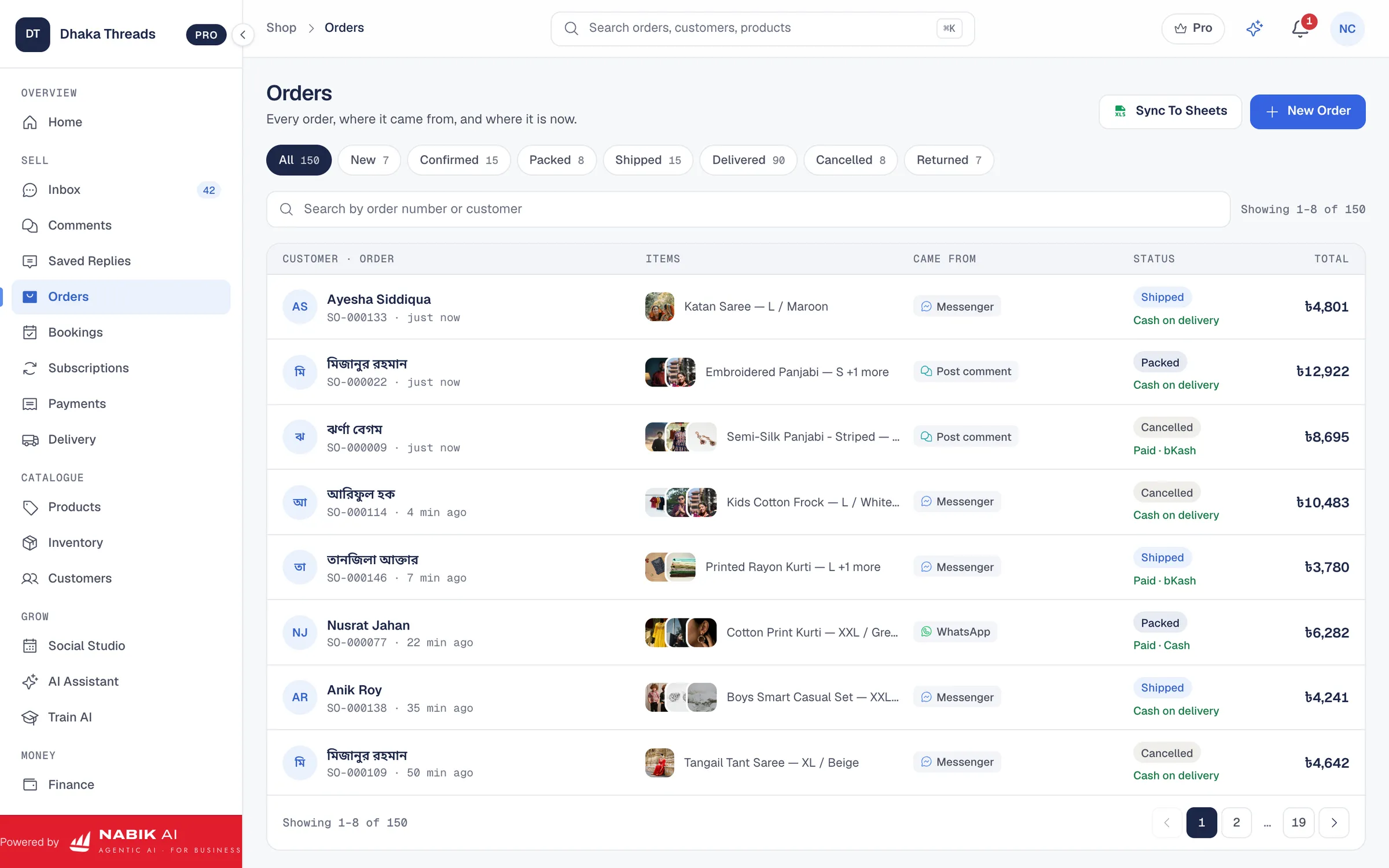
- Every order has its own ID and status.
- You can filter orders by courier, city or status.
- Customers get 3–5 short updates from order to delivery.
- Staff can see notes like wrong number, reschedule, refused.
| System Type | Pros For Small Shops | Main Problems |
|---|---|---|
| Manual (notebook/Excel) | Free, easy to start, works for very low volume | Hard to search, easy to forget updates, customer messages stay manual |
| Courier-only tracking link | Simple, looks professional, no extra cost | You still have to send the link and explain delays |
| Full order tracking system | All orders, chats and statuses in one place, can auto-update customers | Needs some setup and training, usually a monthly fee |

How Can You Set Up Tracking With Your Courier?
Your courier is the backbone of your order tracking system in Bangladesh. If you do not know their tracking tools, you will always be blind after handing over the parcel. So the first step is to sit with your courier account manager or helpline and learn exactly how they track parcels.
Most Bangladeshi couriers offer at least one of these: a tracking website, a merchant app, daily Excel reports on email, or SMS updates. Log in and test it yourself with a sample parcel. Learn which statuses they use, like "Picked", "In Transit", "Out For Delivery", "Delivered", "RTS" (return to shipper) etc. Then match those with your own internal statuses.
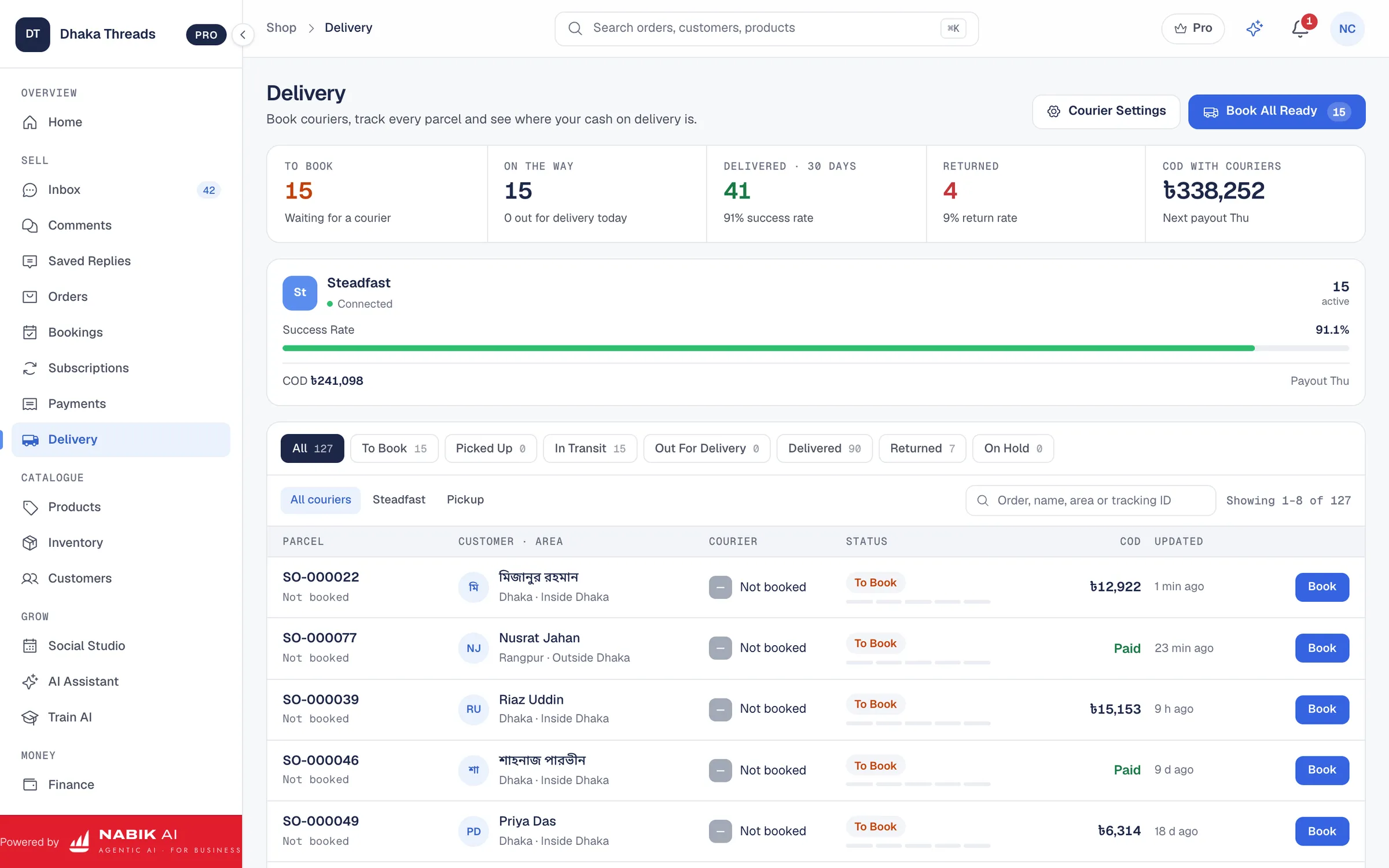
If you use a system that integrates couriers, you can pull many of these statuses automatically into your own dashboard. For example, tools like Nabik AI combine order management and courier integration, so you see courier status directly next to each order. That saves time opening 3–4 courier tabs every morning.
Even if you are fully manual today, build a habit: check courier status twice a day and write it in your sheet. Mark risky parcels, such as more than three days “in transit” or multiple failed delivery attempts. Call those customers first and confirm address or timing before the parcel returns.
- Ask couriers for merchant login to their tracking portal or app.
- Note down their status names and map them to your own.
- Download or copy tracking information into your own sheet or system.
- Create a daily routine to check stuck or delayed parcels.
Step 1: Collect All Courier Details
Make a list of every courier you use, their portal link, login ID, contact person and helpline number.
Step 2: Test A Sample Parcel
Book one parcel to yourself, track every status update and note how long each step takes inside and outside Dhaka.
Step 3: Create Your Status Map
Decide which courier status will trigger which customer update message from your side.
How Do You Update Customers Automatically?
Automatic updates are the difference between a basic tracking link and a real order tracking system Bangladesh online shops can depend on. Your goal is simple: when status changes, the customer gets a short, friendly message on the same channel they ordered from. No one needs to copy–paste all day.
For Facebook and Instagram sellers, this means Messenger and comments. For many Bangladeshi shops, WhatsApp is also big. You can use tools like a unified inbox such as Nabik AI’s social inbox to connect Messenger, Instagram and WhatsApp in one place. Then when you change an order status, the system can send a template message automatically.
A basic flow could be: confirmation immediately after order; ready-to-ship when packed; handover update with courier name and tracking link; out-for-delivery reminder for COD; and final “thank you” after delivery. For delayed parcels, send a short apology with a new expected date instead of waiting in silence. Use Bangla or Banglish that sounds like you, not a robot.
Even without full automation, you can use message templates. Save ready-made texts for each status and paste them quickly in replies. That alone can cut your message time in half and still keep customers informed.
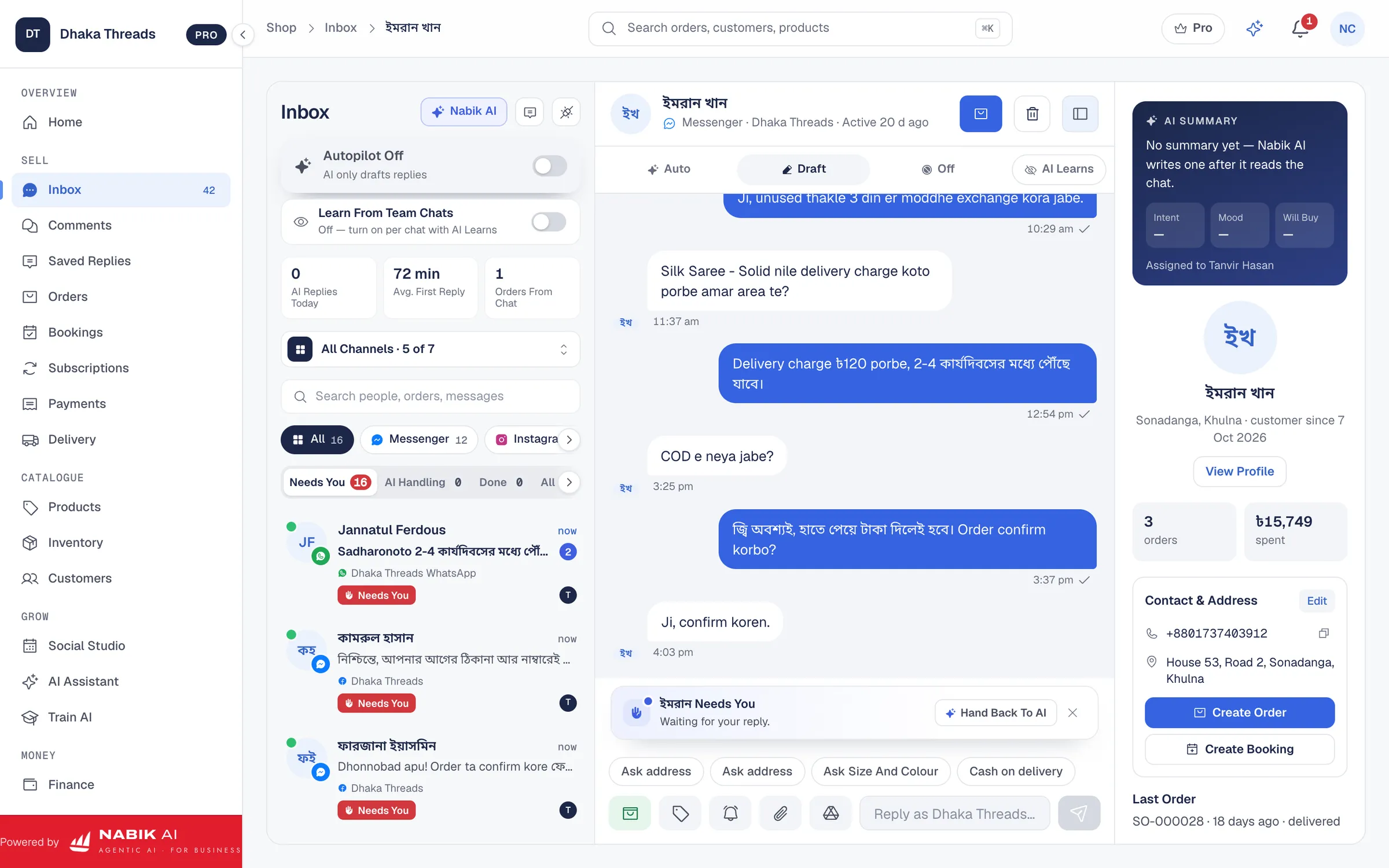
- Choose 3–5 key points to message: order placed, shipped, out for delivery, delayed, delivered.
- Use the same channel they used: Messenger, WhatsApp, Instagram DM, SMS.
- Keep messages short, clear and in friendly Bangla or Banglish.
- Prepare templates so your team does not rewrite the same thing every time.
Step 1: Write Your Message Templates
For each status, write a 1–2 line Bangla/Banglish message including order ID, courier and expected date.
Step 2: Decide Who Triggers Updates
If you are still manual, assign one person per shift to change statuses and send updates after packing and handover.
Step 3: Test With 10 Orders
Apply your new flow to 10 orders and track how many customers still ask for updates.
How Should You Handle COD, Delays And Courier Problems?
Cash on delivery makes order tracking in Bangladesh more sensitive. Until the parcel is in the customer’s hand, the money is not yours. So your tracking system must focus on preventing unnecessary returns. Many failed COD deliveries start from confusion: customer forgot, did not know courier name, or thought delivery was still far away.
Send a reminder on the morning of delivery where possible: “Ajke apnar parcel delivery dite asbe, please phone ta on rakhben, taka ready rakhben.” If courier shows “customer unreachable” or “address incomplete”, call the customer yourself. Then update them by message with new plan. This small effort can save hundreds of taka per parcel in wasted courier charge.
For delays, honesty works better than silence. If a flood, hartal or courier overload slows parcels, send a broadcast or individual update explaining the new time. You do not need to blame anyone. Just say what is happening and what they can expect now.
Returned parcels need a clear process too. Mark them as returned in your system, adjust stock, and if any advance payment was taken by bKash or Nagad, decide your refund rules. Our separate guide on reducing fake COD orders can help you tighten your confirmation and tracking together.
- Always confirm COD orders properly before shipping, especially outside Dhaka.
- Use delivery-day reminders to reduce “I forgot” and refused parcels.
- Call quickly when courier marks unreachable or wrong address.
- Log every return with reason so you can see patterns and fix them.
How Do You Choose Tools For Your Order Tracking System?
You do not have to jump directly into a big system. Start from where you are and upgrade step by step as your orders grow. Think of three layers: basic spreadsheet, small software tools, and full platforms that connect chat, orders and couriers.
A spreadsheet is OK if you ship 5–10 parcels per day and mostly inside Dhaka. Once you hit 20–50 parcels daily, especially nationwide, you will feel the pain of checking multiple courier portals and replying to messages manually. That is the time to look at software that can connect orders and couriers for you.
When choosing, look for a clear order list, courier status sync, and easy messaging to customers. For Facebook and Instagram shops, tools that integrate with your Page and inbox save huge time. Nabik AI is one of these options, built in Bangladesh, and connects chats, orders and couriers for local shops.
Whatever you pick, test with a small group of orders before moving everything. Check how many customer questions reduce, how fast your team can process orders, and if any step feels confusing. A tool is only good if your staff actually use it every day.
- Match the tool to your current order volume, not your dream volume.
- Check if it works well with your main couriers and channels.
- Avoid systems that force you into one courier if you need flexibility.
- Always do a 1–2 week trial run before fully switching.
| Stage | Typical Daily Orders | Main Tools | Key Upgrade Trigger |
|---|---|---|---|
| Basic | 1–10 | Notebook, Excel/Google Sheet | You cannot remember which parcel is where |
| Growing | 10–50 | Sheet + courier portals + message templates | You spend more time replying than selling |
| Scaling | 50+ | Full platform like Nabik AI | You need one place for chats, orders, couriers and finance |
How Does Nabik AI Help With Order Tracking?
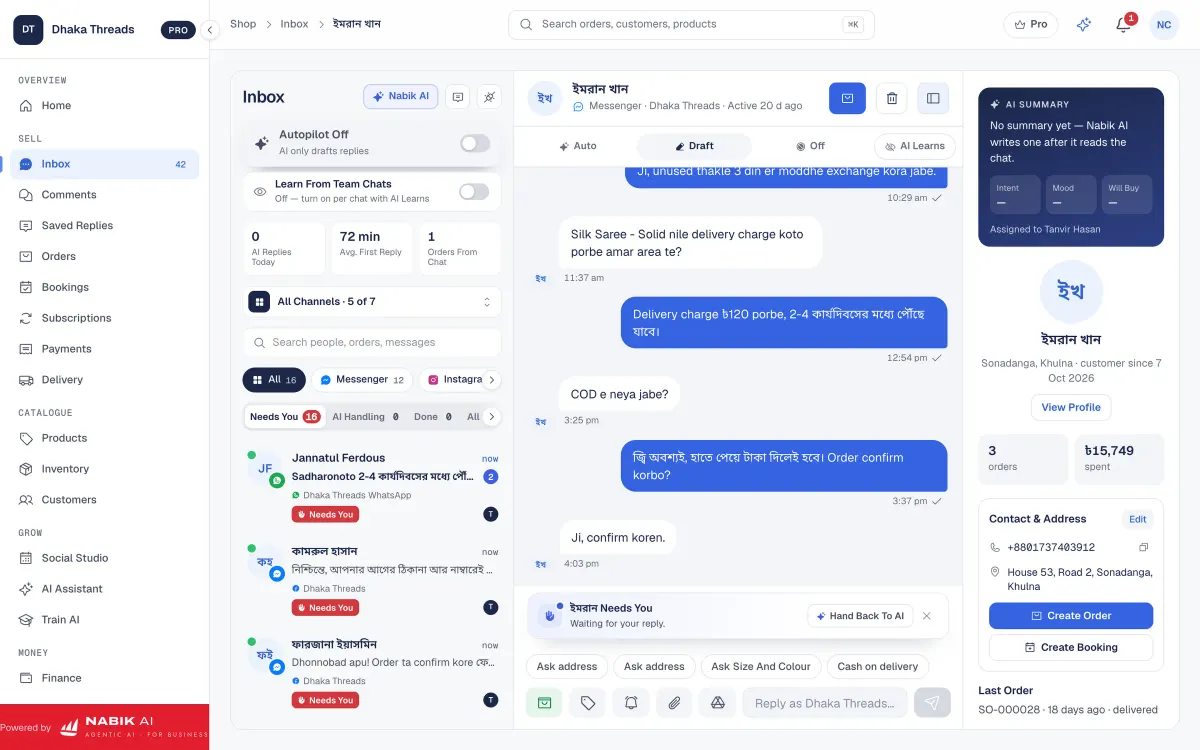
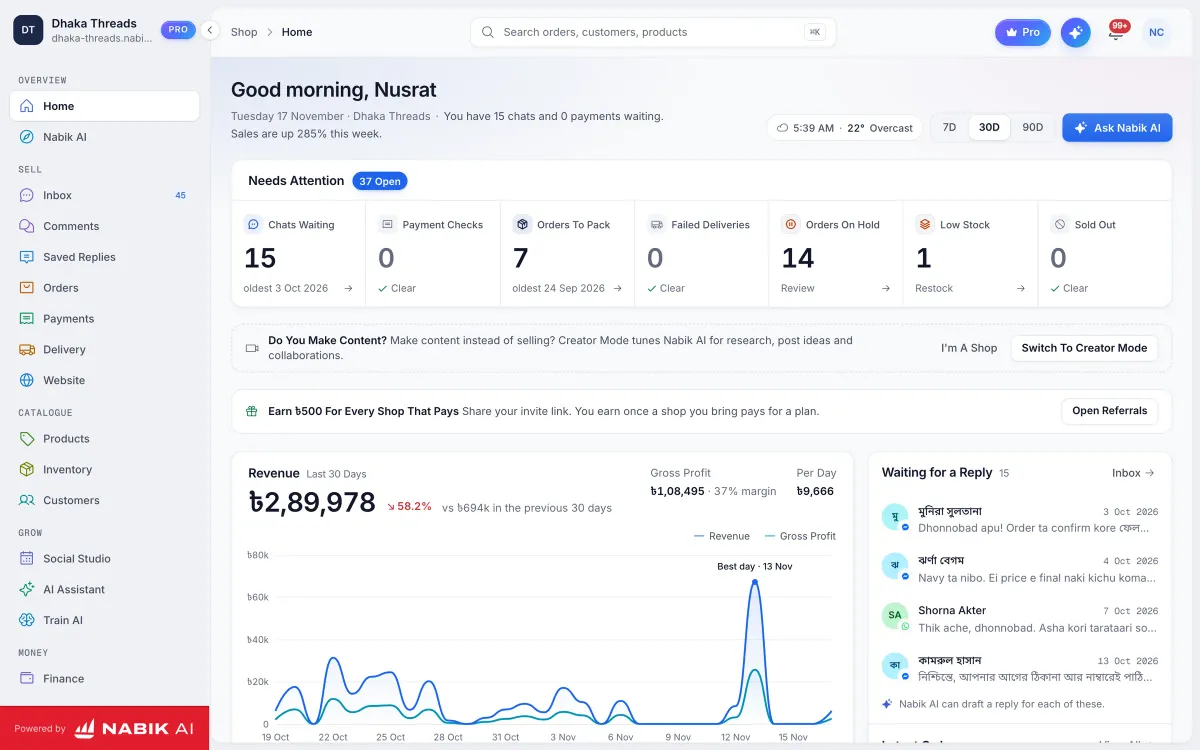
Nabik AI is web software from Bangladesh that connects your Facebook, Instagram, WhatsApp and even website orders in one system. Its AI agents can answer customers in Bangla, Banglish or English using your own product list, prices and delivery policies. For order tracking, this means the assistant can tell a customer where their parcel is based on your real order data.
Inside Nabik AI you can create orders from chat, manage cash on delivery, and see statuses like pending, packed, shipped, delivered and returned. With its order management and courier integration features, you can book couriers from the same screen and later see which parcels are stuck. The AI can reply to messages like “Bhai, amar order kobe dibe?” with the correct status and expected delivery date.
Because Nabik AI has a social inbox, you no longer jump between Messenger, Instagram and WhatsApp. When you update an order, anyone on your team can see the latest status and chat with the customer from the same place. Plans start free, and paid plans like Pro (৳999/month) and Business (৳3,780/month) are priced in taka. AI usage is based on credits, which you can read about at /ai-credits.
You teach Nabik AI by chatting with it and correcting it when needed. Over time it learns your style and policies. It can also hand over to a human when a situation is complex, like a lost parcel or argument over a COD return. That way your customers feel heard, and your team only steps in when it really matters.
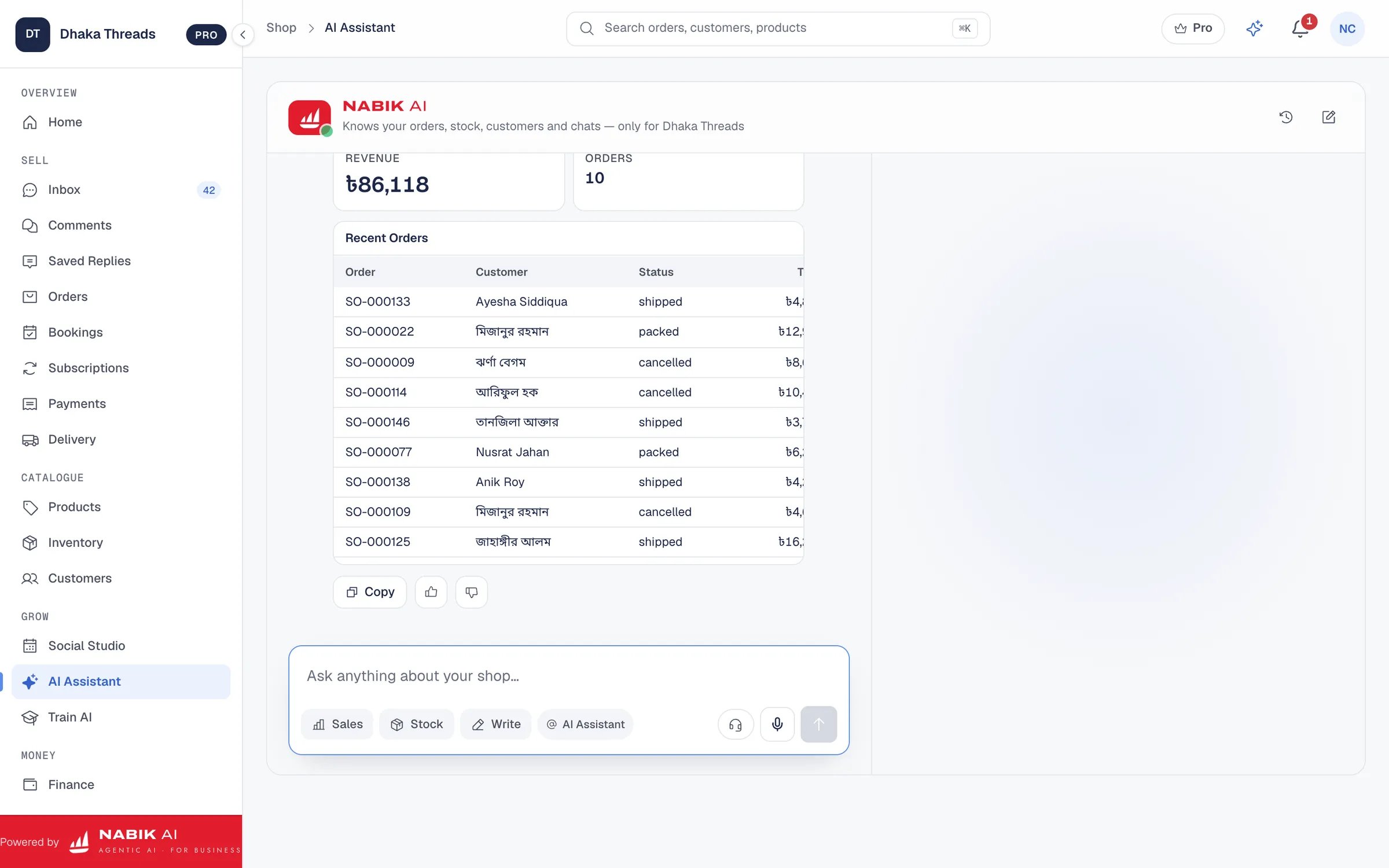
- One system for chats, orders, inventory and couriers.
- AI that answers tracking questions in Bangla, Banglish or English.
- Simple browser app that works on desktop and phone.
- Taka-based pricing with a free starting plan for small shops.
Step 1: Create Your Account
Go to https://app.nabik.ai/signup and open a free account with your shop details.
Step 2: Connect Your Pages And WhatsApp
Link your Facebook Page, Instagram and WhatsApp so Nabik AI can see and manage incoming messages.
Step 3: Set Up Orders And Couriers
Add your products, start creating orders from chats, and connect couriers so tracking data appears in your dashboard.
What Can You Improve This Week To Level Up Tracking?
You do not need a perfect order tracking system in Bangladesh from day one. But you can make real improvements in just one week. Start by mapping your current process from order to delivery and writing down every place where customers usually get confused or start complaining.
Then, choose three quick wins. For example: give every order an ID, write 4–5 message templates for main statuses, and agree a fixed daily time to check courier portals and call problem parcels. If you already use software, check if you are using its tracking and messaging features properly or just basic order taking.
Next week, test a tool like Nabik AI or another system that can connect your chats and couriers. Use it for a small portion of orders first, maybe just Dhaka deliveries or just one courier. Measure how many “parcel koi?” messages you get compared to your old method.
Over a month or two, your goal is simple: most customers hear from you before they feel the need to ask. When that happens, your inbox becomes calmer, your COD returns shrink, and you get more time to grow the business instead of fire-fighting deliveries.
- Audit your current tracking and list the top 3 problems customers face.
- Create simple order IDs and message templates in Bangla/Banglish.
- Fix a daily routine to check courier status and call risky parcels.
- Pilot a connected tool like Nabik AI with part of your orders.
FAQ
What is the easiest order tracking system for a small Facebook shop in Bangladesh?
If you ship fewer than 10 orders a day, a simple Google Sheet with order ID, customer name, phone, address, courier and status is enough. Combine it with courier tracking links and message templates you paste into Messenger or WhatsApp.
How can customers track orders without messaging me every day?
Send them the order ID and tracking link as soon as you hand over to courier, plus a short note on expected delivery time. If you use tools like Nabik AI, you can also let customers ask “amar parcel koi?” and the AI will answer from your real order data.
Do I need a website to use an order tracking system in Bangladesh?
No, you can run a full tracking system even if you only sell on Facebook, Instagram and WhatsApp. The important part is having software or a process that connects orders, courier statuses and customer messages in one flow.
How many tracking messages should I send for each order?
For most Bangladeshi customers, 3–5 updates are enough: order confirmed, handed over to courier, out for delivery, delayed (if needed) and delivered. More than that can feel like spam; less than that makes people nervous, especially for COD.
Can order tracking help reduce fake or refused COD orders?
Yes, because customers feel more secure when they see clear updates and reminders. Combined with proper order confirmation and clear policies, good tracking reduces no-pickup and “I did not order” problems; you can learn more from our guide on reducing fake COD orders.
Which courier has the best tracking in Bangladesh?
It changes over time and depends on your area, so test with your own parcels. Instead of only listening to promises, book sample parcels with 2–3 couriers, track them and choose the one whose portal or app is most accurate and easy for your team to use; our guide on choosing a courier service in Bangladesh can help you compare.