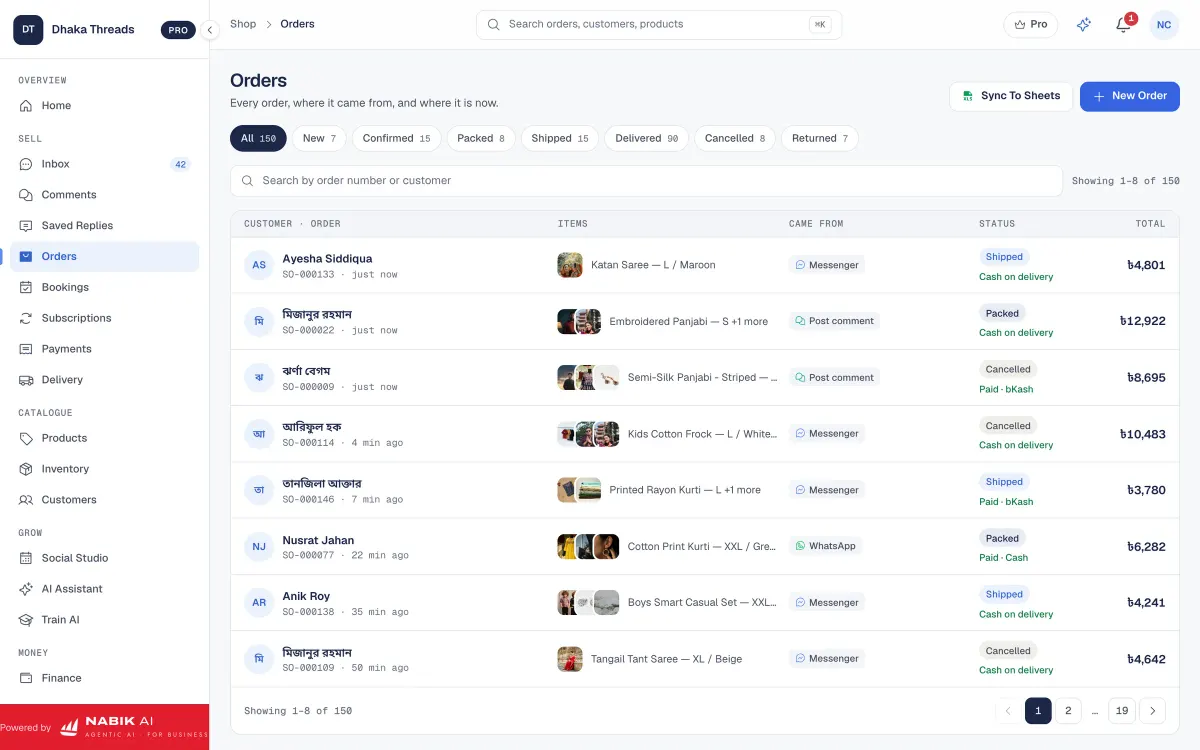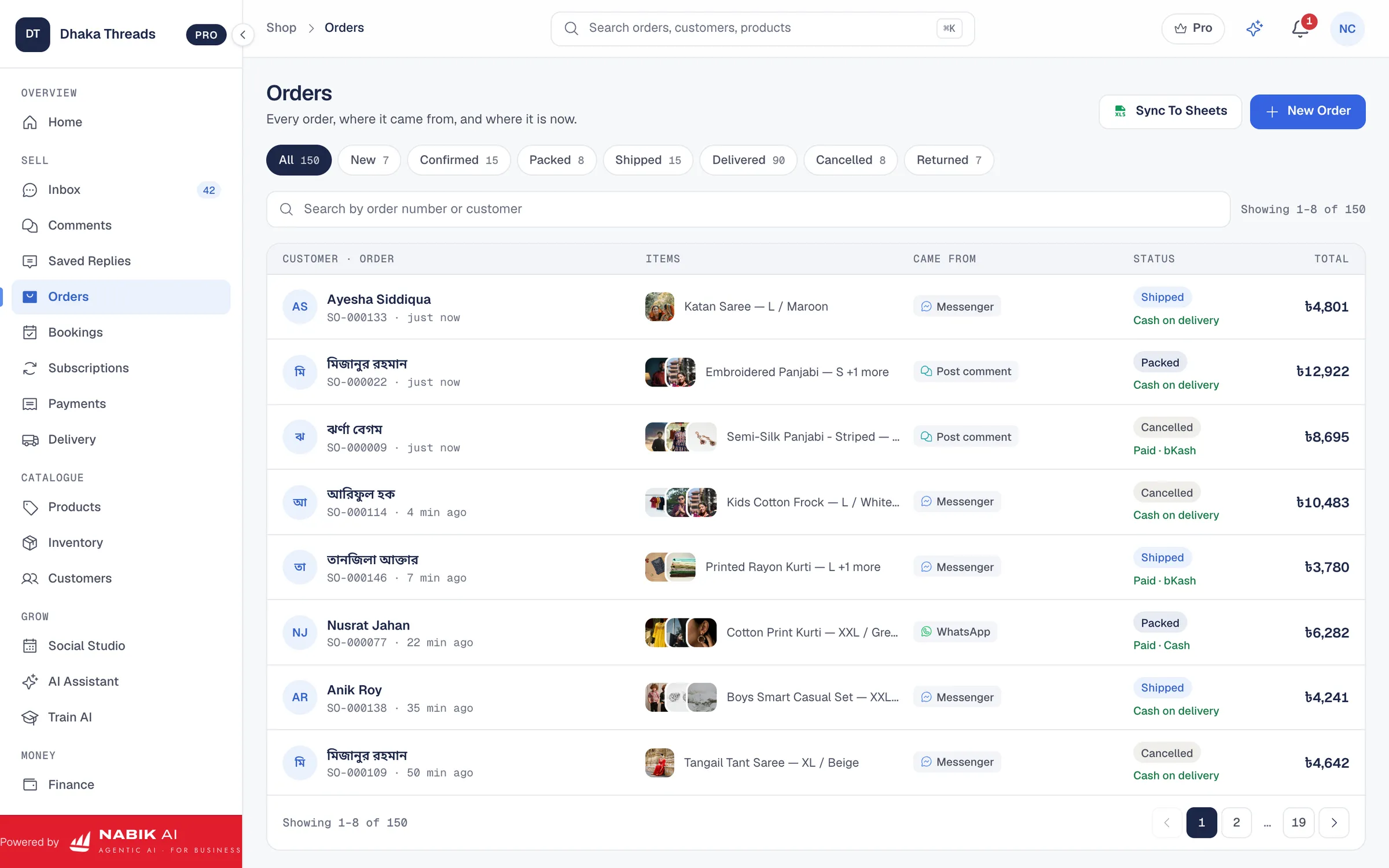
An order management system in Bangladesh should collect orders from your sales channels, help you confirm customer details, track payment and delivery status, and keep stock information organised. For a small shop selling through Facebook, Instagram or WhatsApp, it should make the order journey easier to follow without relying on scattered chat messages and notebooks.
The best setup is not necessarily the one with the most features. It is the one that helps you avoid missed orders, reduce preventable COD returns and see what needs attention today.
Key Takeaways
- Record each order with the customer’s name, phone number, full delivery address, items, quantities and agreed price.
- Separate new, confirmed, packed, dispatched, delivered and returned orders so staff can see the next action.
- Check COD details and stock before handing a parcel to a courier.
- Choose a system that fits your sales channels and daily process, rather than adding complexity you will not use.
- Review order and return patterns regularly to find where your process needs improvement.
What Should An Order Management System Do?
An order management system should give your team one dependable record for each purchase, from the first customer message to delivery or return. It should store the customer’s contact details, delivery address, products, variants, quantities, prices, payment method and order status. When a buyer asks, “আপু, অর্ডারটা কনফার্ম হয়েছে?”, staff should be able to check the record instead of searching through old messages.
For a small business, the system should also make common mistakes easier to spot. A phone number with missing digits, an address without a district, or a product quantity that exceeds available stock can create extra work later. A good process gives someone a chance to review these details before packing. It should also make it clear who is responsible for the next action, especially when more than one person handles messages, packing and courier handover.
- Keep one order record rather than copying the same details into several notebooks or sheets.
- Show the current status and the next task for each order.
- Let staff find an order by customer name, phone number or order reference.
- Keep a record of cancellations, failed deliveries and returns, not only successful sales.
How Should It Capture Orders From Social Channels?
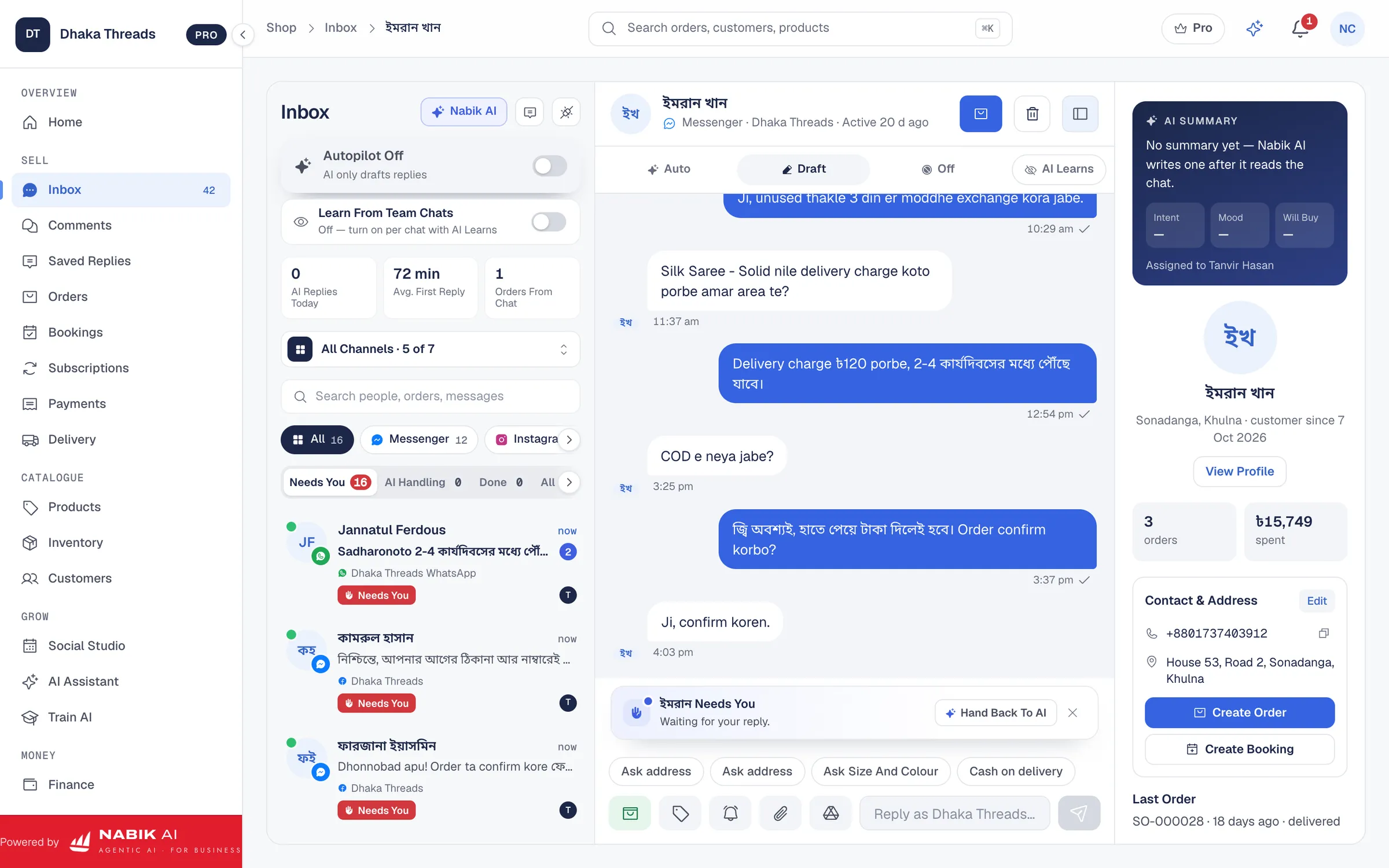
Many Bangladeshi shops receive orders across Facebook Messenger, Page comments, Instagram and WhatsApp. An order system should help staff move the important details from those conversations into a consistent record. That means capturing the exact item, size or colour, quantity, agreed price and delivery charge, rather than relying on a screenshot or a message that can get buried.
Decide what counts as a confirmed order before you begin recording it. A customer asking “price koto?” is not yet a buyer, and a comment saying “inbox” is not enough information to dispatch a parcel. Use a short checklist to collect the customer’s name, working phone number, full address, selected variant and payment method. If the customer has not agreed to the final total, keep the order unconfirmed and ask before preparing it.
- Use the same order fields for Facebook, Instagram, WhatsApp and phone orders.
- Record the customer’s own choice of product and variant; do not infer it from an unclear message.
- Keep the final price, delivery charge and payment method visible to the person packing the order.
- If several staff answer messages, define who is allowed to mark an order as confirmed.

How Can You Check COD Orders Before Dispatch?
Cash on delivery is convenient for many buyers, but it can leave a shop with courier costs and returned parcels when a customer does not accept delivery. An order management process should make it easy to check important details before a COD order is packed. Confirm the customer’s phone number, address, selected items, total amount and whether the customer understands the delivery charge and expected delivery process.
Use a consistent confirmation method rather than treating every message as proof that an order is ready. For example, ask the customer to confirm the product, quantity, total payable amount and delivery address in one reply. If the address is vague, clarify the area, landmark and district. For orders that seem incomplete or inconsistent, pause and contact the buyer before handing the parcel to a courier. These checks cannot guarantee that every parcel will be accepted, but they can catch avoidable errors.
- Confirm the order and total payable amount in writing.
- Check that the phone number and delivery address are complete and readable.
- Flag unusually large quantities or repeated changes for a person to review.
- Track cancelled and returned orders so you can identify recurring problems.
How Should Order Statuses And Courier Handover Work?
Order statuses help your team see what has happened and what remains to be done. Keep the names simple and use them consistently: new, awaiting confirmation, confirmed, packing, dispatched, delivered, cancelled or returned. If one staff member calls an order “ready” while another uses that word to mean “already sent”, the status creates confusion instead of preventing it.
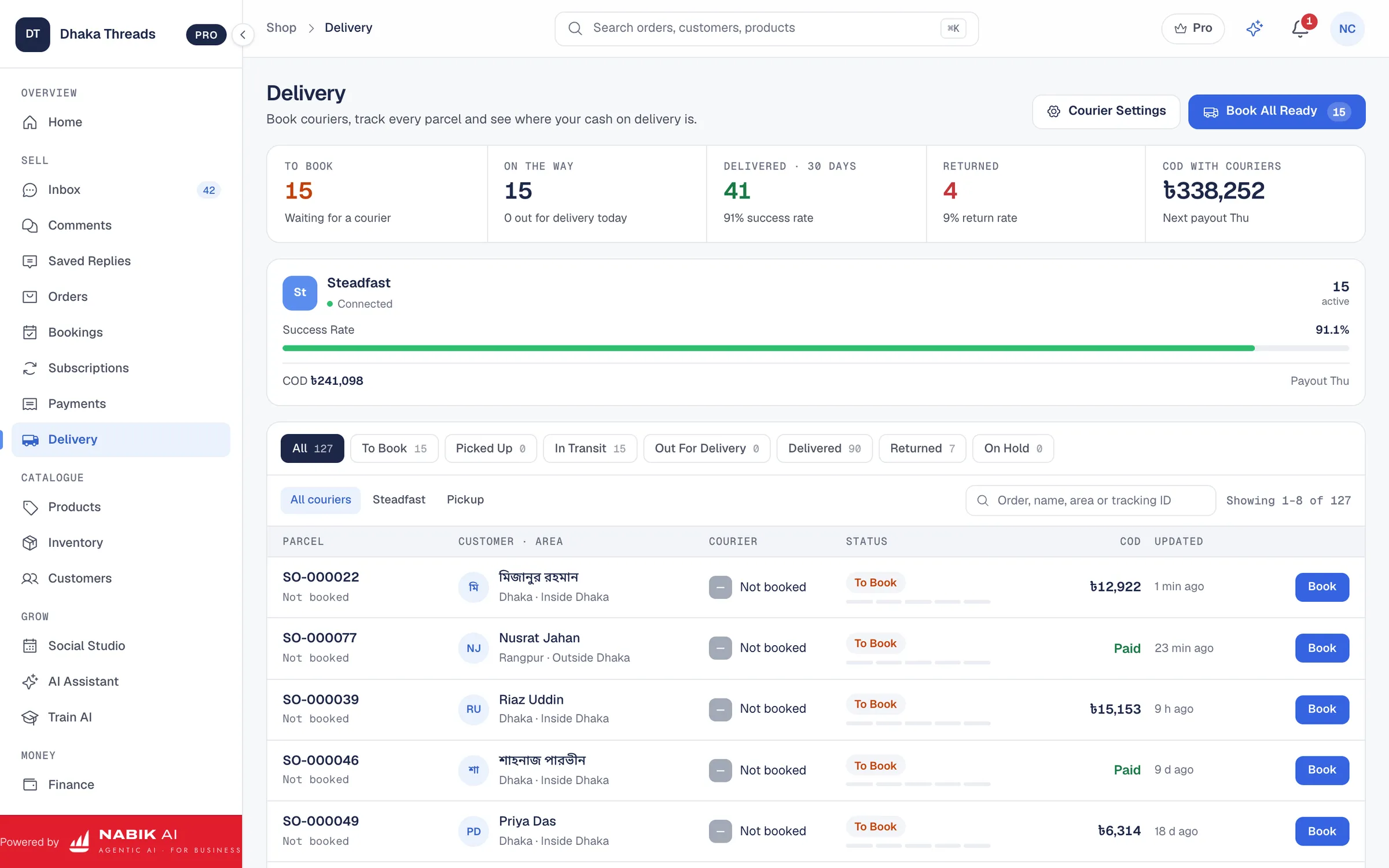
Before courier handover, match each parcel with its order record and check the recipient’s phone number, address, parcel contents and cash-on-delivery amount. Record the courier handover and tracking reference where your process allows it, then update the customer with a clear dispatch message. When a parcel is delayed, refused or returned, update its status and decide who will contact the customer. A system that supports order management for chat orders and COD can help keep order details and status changes together.
- Define what action moves an order from one status to the next.
- Match the parcel label and COD amount against the order before handover.
- Record a courier reference so staff can find the parcel later.
- Use a courier booking and parcel tracking workflow if it fits the courier services your business uses.
How Do Stock And Customer Records Fit Into Order Management?
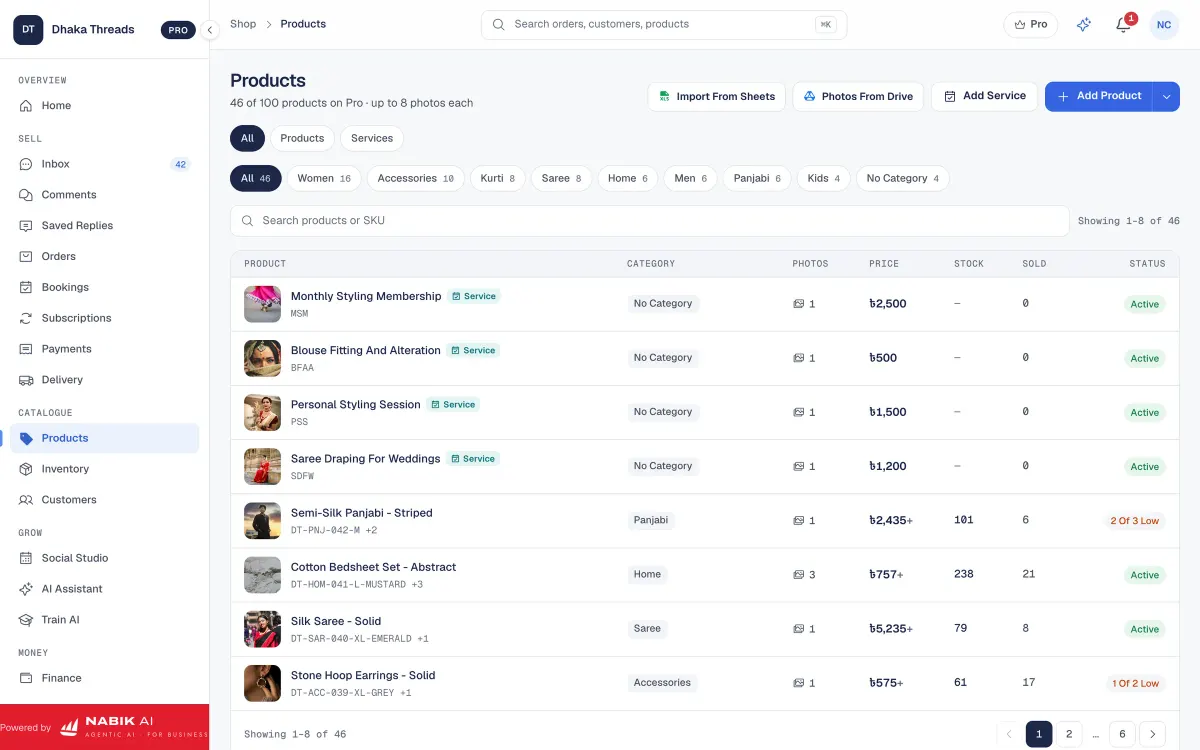
A shop can accept an order successfully and still create a problem if the item is out of stock. Connect order handling with a dependable stock-counting routine, especially if you sell different sizes, colours or models. Deduct stock when your team’s chosen policy says the item is reserved or sold, and make sure cancelled orders are handled consistently. If the same products are sold through several channels, a shared stock pool can reduce the chance of promising the last item twice.
Customer records can also help staff answer repeat buyers without asking for the same basic details every time. Keep useful information such as previous orders and preferred delivery details, but check with the customer when anything may have changed. Do not treat an old address or phone number as automatically correct. For a practical stock process, review inventory management for multiple sales channels and decide how it fits your actual product variants and team responsibilities.
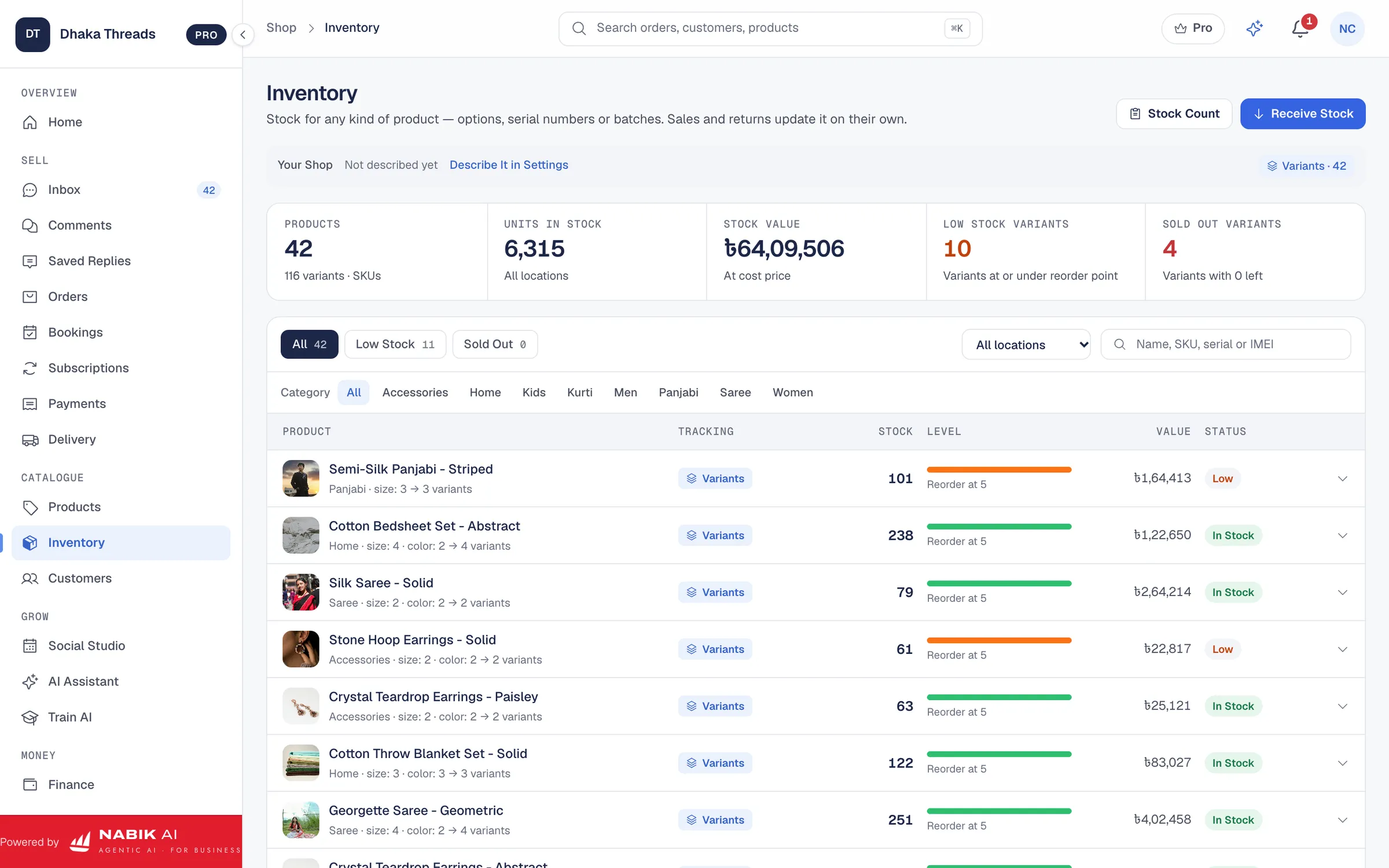
- Count stock by variant, such as size and colour, rather than only by product name.
- Choose when stock is reserved and explain the rule to everyone handling orders.
- Review low-stock items before running a promotion or posting a popular product.
- Confirm saved customer details before dispatching a new order.
How Do You Choose A System For A Small Business?
Start with the problems that cost your shop time or money: missed messages, duplicate orders, incorrect COD amounts, stock mismatches or uncertainty about which parcels have been delivered. Then compare systems against those needs. A simple sheet may be enough when one person handles a small number of orders, but it can become difficult to maintain when several staff members or sales channels are involved. Consider how much time it takes to enter and update each order, not just how many functions the software lists.
Check whether the system is comfortable to use on the devices your team already has, including phones used during packing or customer calls. Ask how statuses, customer details, cancellations and returned parcels are recorded. If you rely on Facebook and other social channels, look for a workflow that brings conversations and orders together in a way staff can understand. For example, a social inbox for Messenger, WhatsApp, Instagram and Page comments can reduce the need to search several separate conversations.
- List your essential tasks before comparing products.
- Test the full journey with a sample order: enquiry, confirmation, packing, dispatch and delivery.
- Check how your team will correct mistakes and handle cancellations or returns.
- Choose a process staff can follow during both quiet periods and sale rushes.
How Can Nabik AI Help With Order Management?
Nabik AI is web software made in Bangladesh by Auto Probaho Technology for shops, service businesses and content Pages that sell on Facebook, Instagram, WhatsApp and their own websites. Its AI agents answer customers in Bangla, Banglish or English using the shop’s own products, prices and policies, take the order and hand over to a person when needed. The shop teaches Nabik AI by chatting with it, and it learns from every correction. This can be useful when a shop wants customer conversations and order work connected, while keeping a person involved when a question needs attention.
Around the agents, Nabik AI includes one inbox for Messenger, WhatsApp, Instagram and Page comments, orders with cash on delivery and courier booking, and inventory with one stock pool for every channel. It also includes Social Studio for scheduled posts, AI captions and AI pictures, plus customer, finance, booking and AI credit functions. The software runs in a browser on desktop and phone, and plans are priced in taka with a free starting plan. Review the Facebook Page AI chatbot details and check whether the workflow suits your shop before changing how your team handles orders.
- Prepare accurate product names, prices, variants, delivery charges and shop policies.
- Test order details using real examples from your own chats before relying on a new workflow.
- Keep a person available to review unusual requests, unclear addresses and corrections.
- Compare the system with your current process and train the team on the agreed order statuses.
FAQ
What Is An Order Management System For A Small Business?
It is a process or software system for recording orders and tracking them from customer enquiry through packing, delivery, cancellation or return. For a small Bangladeshi shop, it should keep customer, product, payment and delivery details easy to find.
Can I Manage Facebook And WhatsApp Orders In One System?
You can use a system that supports orders from multiple channels, but check exactly how conversations and order details are brought together. Your team still needs a clear rule for confirming an order and updating its status.
What Details Should I Collect For A COD Order?
Record the customer’s name, working phone number, complete address, products, variants, quantity, total payable amount and delivery charge. Confirm these details with the buyer before dispatch, especially if any part of the address or order is unclear.
Does Order Management Software Prevent COD Returns?
No system can guarantee that every customer will accept a parcel. A consistent confirmation process can help catch incomplete addresses, incorrect quantities and misunderstandings about the total before you hand an order to a courier.
Should A Very Small Shop Use Software Or A Spreadsheet?
A spreadsheet may work if one person handles a small number of orders and updates it reliably. Consider software when orders come from several channels, multiple staff need access, or it becomes hard to track stock and parcel status.